Super Phone
Operation Manual
SP-3000
CONTENTS
Understanding the Super
Phone
A Brief Overview
No Computer Needed
User-friendly Interface
Main Features
Super Phone-to-Super Phone Mode
Phone to Super Phone Mode
Super Phone-to-Phone Mode
Direct-IP Mode
Installation�
Package Contents
Internet
2 Wiring installation of the
Super- Phone
3 Input Data from Telephone
Keypad:
4 Input Basic Information
Personal Account Maintenance
Super Phone LCD Display FAQ Chart
Troubleshooting
Contacting
Super Phone Support
Super Technologies, Inc.
Understanding
the SP-3000
Congratulations!
You have selected the future-proof Internet Telephony product.
SP-3000 is an innovative and standards
compliant Voice over Internet Protocol
(VoIP) solution for corporations and individuals. SP-3000 allows various
connection modes like SP-3000-to-SP-3000, SP-3000-to-Super Phone,
SP-3000-to-Super Phone, SP-3000-to-Phone and Phone-to-SP-3000 via Internet or
other TCP/IP networks.
Traditionally, real-time
voice communication is sent over Public Switched Telephone Network (PSTN). With
circuit-switched technology, each call uses dedicated bandwidth. End-to-end
calls are established on the basis of a sequence of dialed digits, and the PSTN
dedicates a physical path between callers. Although the telephone equipment
establishes the call path at the beginning of the call, the path may change
between calls, but not during any specific call. In comparison with the
PSTN, an Internet Protocol (IP) network has a packet-switched architecture.
Data transmits in packets. The path from end to end can vary within an
established session. The data packets contain the destination IP address
information, for packet routing. As networking environments change, routing
devices update with dynamic protocols. SP-3000 is a complete Ethernet phone
set. It transmits voice traffic over IP-based packet-switched networks and be
used as a traditional PSTN telephone.
SP-3000 provides Ethernet phone, digital
phone, and mini-hub functions. Allows users to receive phone calls from
Internet and PSTN (Public Switched Telephone Network) at the same time. By
using SP-3000, miss no more phone calls.
Start big savings. Own an SP-3000 today!
Better yet, thanks to SUPER TECHNOLOGIES� JustDialIt
Technology, your receiver end does not need another SP-3000 to enjoy the
advanced VoIP technology. Long-distance and international call charges
disappear with this extraordinary device. The first intelligent Ethernet Phone,
it offers full duplex, supreme quality and low latency voice conversation
Virtual Phone line.
With SP-3000�s Regular Phone to Super Phone feature, have a USA
phone number for anywhere in the world where there is Internet. Get a 206 code
number or even a 1-800 Toll free number to work on your Super Phone. For more
details, visit http://www.virtualphoneline.com
A Brief Overview
In the past, real-time
voice information is sent over the Public Switched Telephone Network (PSTN).
With the Circuit-Switched Technology, every call takes up a dedicated
bandwidth. End-to-end calls are established on the basis of a sequence of
dialed digits, and the PSTN dedicates a physical path between callers. Although
the telephone equipment establishes the call path at the beginning of the call,
the path may change between calls, but not during any specific call. In comparison with a PSTN, an Internet
Protocol (IP) Network has a Packet-Switched architecture. Devices transmit data
in packets, and the path from end to end can vary within an established
session. In addition to data, packets also contain addressing information, that
routing devices use to send information to its destination. Routing devices
maintain tables which instruct them how to direct packets. As networking
environments change, routing devices update with dynamic protocols.
Traditionally, the PSTN was the only network supporting voice communication.
With a Super Phone, voice traffic can be sent over IP-based Packet-Switched
networks!
No Computer Needed
SP-3000 has its own processor and network
interface; it works independently and intelligently! Dial the IP address or device
ID of the remote party from your SP-3000. Now, you can talk via the Internet.
All communication costs are eliminated except a local Internet connection
charge. SP-3000 Ethernet phone conveniently makes Internet phone calls and IDD
(International Direct Dialing) calls.
User - Friendly Interface
SP-3000 is an intelligent Ethernet phone with VoIP, digital phone, and
mini-hub functions. SP-3000 is a migration to IP telephony with the coexistence
of circuit-switched networks. The dual Ethernet/PSTN interface lets users
receive calls at once from Internet and PSTN lines. SP-3000's built-in mini-hub
relays the network to other nodes like a PC.
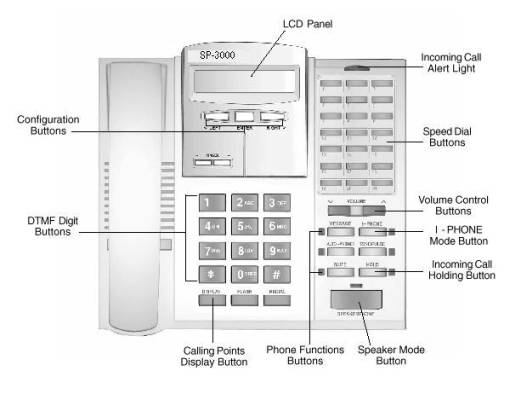
As a full-featured IP key phone, SP-3000is logically equipped with speed-dial,
speaker-phone, auto-answer, mute, redial, hold function and much more. The LCD
display provides users with snapshots of setup guidance, connection quality,
cal party identification and conversation status. Additional notable features
include automatic on-line software upgrades and an optional built-in digital
answering machine.
Package Contents
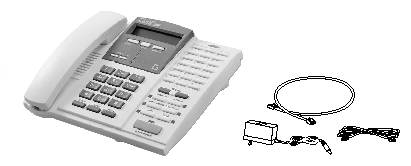
ER In the Super Phone package,
users will find:
An SP-3000 main unit
A handset
A handset cord
Two stands
A 12V/1A DC power adapter
A RJ-11 phone line cord
A RJ-45 network cable
An operation manual
A warranty card
Basic Requirements to Use Super Phone
Technical Specifications
|
Dimensions |
242mmx208mmx74mm ( 9.5"x8.2"x2.9" ) |
|
Weight |
Approximately 1.5kg�
( 3.21 Lbs ) |
|
Power |
DC12V 1A |
|
Temperature |
0 - 50� ( 32� ~ 122� F ) |
|
Humidity |
10% to 90% non-condensing |
|
Internal RAM |
2M bytes |
|
Flash Memory |
1M bytes |
|
LCD Display |
20 X 2 LCD display |
|
Telephone Interface |
Two RJ11 jacks to line and phone |
|
Voice Compression |
G.711, G.723.1 ,G.729 |
|
Network Protocol |
TCP/IP, UDP, DHCP, BootP, Telnet |
|
Network Interface |
Two RJ45 jacks to LAN and PC |
|
Button Features |
9 functional & 21 programmable buttons with LED
indicators. |
|
Optional Protocols |
H.323, MGCP, SIP |
|
Optional Function |
Answering machine for incoming PSTN calls |
Installing
Your SP-3000
As seen in the graph below, connecting
SP-3000 is clear as connecting a laptop PC.

1. Plug an Ethernet port with the Internet
connection into the RJ45 jack labeled LAN.
2. Plug a regular phone line into the RJ11
jack labeled LINE.
3. Plug power adapter into a power outlet.
Plug the DC adapter connector into SP-3000 power socket labeled DC 12V.
Ready to
Configure
Plug the power connector into SP-3000. See
SP-3000�s LCD panel show the following messages:

After you see the scrolling message on the
LCD panel, you have successfully completed the installation. Begin to configure
your SP-3000 by simply pressing ENTER button to go to the menu.
Configuring
Your SP-3000
With the
smart configuration program, the SP-3000 is ready to use in three minutes!
Before
You Start
To use SP-3000 as an Ethernet phone,
subscribe an Internet access from your
local ISP. xDSL, Cable Modem or Leased Lines.
Get the following information:
1) IP Address: _ _ _ . _ _ _ . _ _ _ . _ _ _
2) Gateway IP Address: _ _ _ . _ _ _ . _ _ _
. _ _ _
3) Subnet Mask: _ _ _ . _ _ _ . _ _ _ . _ _ _
Using
Keypad & Buttons to Configure SP-3000
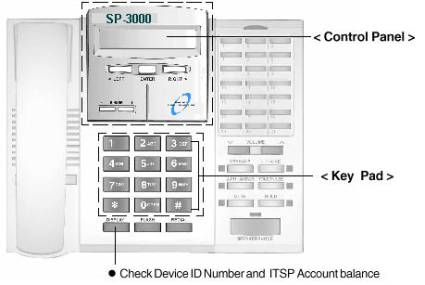
To configure your SP-3000, use the keypad on
the SP-3000 to enter and scroll the menu and to input the necessary information
as seen below. Keep the handset on-hook (on the phone) while you input data.
<
Control Panel >
�
To go to
the Main Menu, press ENTER button.
�
To go to
Sub-menu, go to the Main Menu first ; with setup items containing sub-menu
displayed, press ENTER button.
�
To edit
setup items, select the setup item you want to edit. Then press ENTER button to
input data. After completion of data in put, press ENTER to save. Press
<LEFT> or <RIGHT> to move the previous or next item.
�
To input
data from telephone keypad, refer to Key & Characters Table.
< Key
Pad >
Main Menu
& Sub Menu
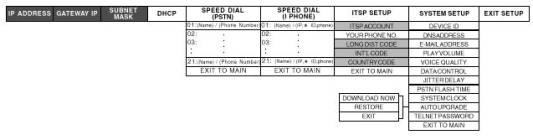
 �Basic Setup Items:
After completing the Basic Setup, make
Internet phone calls from your SP-3000 to anyone equipped with any of SUPER
TECHNOLOGIES� VoIP devices such as SP-3000, Super Phone, and Super Phone.
Basic Setup (SP-3000-to-SP-3000/Super
Phone/Super Phone Mode)

Before you start using your SP-3000,
subscribe an Internet access line from your local ISP. It can be xDSL, Cable
Modem, or Leased Line. To make Device-to-Device Internet phone calls, only IP
ADDRESS, GATEWAY IP and SUBNET MASK information are required.
IP Address (Required)
IP Address is an identifier for devices on a
TCP/IP network. Your IP Address allows other VoIP devices on the Internet to
find your location. The format of an IP address is a 32-bit numeric address
written as four numbers separated by periods.
|
|
Step1 Press
ENTER button to go to Main Menu. The first item is IP ADDRESS. Press ENTER
button to edit. Step 2 Use the keypad to input the IP Address obtained from your ISP. ( e.g. _ _ _ .
_ _ _. _ _ _. _ _ _ ) Step 3 Press ENTER to save and exit edit mode. |
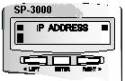
Note: In a DHCP network environment. your ISP
assigns a dynamic IP to you. Go to DHCP item and enable the DHCP function, and
then you can skip the Basic Setup.
Note: The IP address you entered must be a real IP
Address and not used by other equipment such as PC or printer server on the
LAN.
Gateway IP Address (Required)
The purpose of a gateway is to link two
different types of networks. For example, the way the Gateway IP Address for a
LAN connects to the WAN is the IP Address of the router.
|
|
Step 1 With GATEWAY IP displayed, press ENTER to edit. Step 2 Use the keypad to input Gateway IP Address. ( e.g. _ _ _. _ _ _. _ _
_. _ _ _ ) Step 3 Press ENTER to save and exit edit mode. |

Subnet Mask (Required)
Subnet Mask is a mask used to determine which
subnet an IP address belongs to. It empowers the network administrator to
divide the host part of the address into two or more subnets.
|
|
Step 1 With SUBNET MASK displayed, press ENTER to edit. Step 2 Use the keypad to input your subnet mask information. ( e.g. _ _ _. _
_ _. _ _ _. _ _ _ ) Step 3 Press ENTER to save and exit edit mode. |

DHCP
Function

SP-3000 supports DHCP (Dynamic Host
Configuration Protocol) which is a protocol for assigning dynamic IP addresses
to devices on a network. Because a device can be assigned a different IP
address every time it connects to the network, a new device can be added to a
network without hassle of manually assigning it a unique IP address.
|
|
Step 1 If your network is under DHCP environment, with DHCP displayed, press
ENTER. Step 2 Press <RIGHT> to select �On� to enable DHCP function. Step 3 Press ENTER to save and exit. |
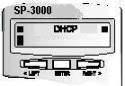
Note: Once you enable DHCP function, skip Basic
Setup.
Note: If you use a steady real IP Address for your SP-3000, please keep the default �Off� for this item.
ITSP
Setup (SP-3000-to-Phone Mode)

ITSP (Internet Telephony Service Provider)
provides telephony service over the Internet. If you would like to call a
receiver not equipped with SUPER TECHNOLOGIES� VoIP product, subscribe ITSP
services provided by SUPER TECHNOLOGIES� Internet Telephony Network. This
section consists of all settings for you to use SUPER TECHNOLOGY Internet
Telephony Service.
ITSP
Account (Required for SP-3000-to-Phone Mode)
To call a party not equipped with VoIP
device, subscribe SUPER TECHNOLOGIES� Internet Telephony Service. You will be
given calling points stored in a 10-digit ITSP Account or installed with your
6-digit Device ID Number. With a valid account, make Internet phone calls to
any regular phone within service areas.
Step 1 With ITSP ACCOUNT displayed, press ENTER to
edit.
Step 2 Use the keypad to input the 10-digit ITSP
Account number
obtained from SUPER TECHNOLOGIES� compatible
ITSPs.
Step 3 Press ENTER to save and exit edit mode.
Note: If your calling points are stored directly
into your Device ID Number, please
leave the ITSP ACCOUNT item as blank.
Note: The default account is Device ID Number
preset in device SP-3000 upon purchase. Ask your retailer or dealer to credit
the default account to use it instantly. Or send an e-mail to sales@Super
Technology.com.tw for more information.
Note: To check your account balance, please press
DISPLAY button. You will see your Device ID Number and/or ITSP Account balance
on the LCD panel.
Your Phone Number (Optional)
Step 1 With YOUR PHONE NO. displayed, press ENTER to
edit.
Step 2 Use the keypad to input your phone number
associated with your SP-3000.
Step 3 Press ENTER to save and exit edit mode.
Long-distance
Code (Required for SP-3000-to-Phone Mode)
Step 1 With LONG DIST CODE displayed, press ENTER to
edit.
Step 2 Use the keypad to input the code for making a
domestic long-distance phone call. (e.g. The long-distance code in USA is 1.)
Step 3 Press ENTER to save and exit edit mode.
International
Code (Required for SP-3000-to-Phone Mode)
Step 1 With INT�L CODE displayed, press ENTER to
edit.
Step 2 Use the keypad to input the code for making
an international phone call. (Ex: The international code in USA is 011.)
Step 3 Press ENTER to save and exit edit mode.
Country
Code (Required for SP-3000-to-Phone Mode)
Step 1 With COUNTRY CODE displayed, press ENTER to
edit.
Step 2 Use the keypad to input country code. (Ex:
The country code of USA is 1.)
Step 3 Press ENTER to save and exit edit mode.
Exit to
Main Menu
With EXIT TO MAIN displayed, press ENTER to
leave ITSP SETUP section.

Device ID
(Non-editable)
Each SP-3000 has a unique 6-digit Device ID
Number. This is on the bottom of the SP-3000. Talk to other online SUPER
TECHNOLOGIES� VoIP Device (SP-3000, Super Phone, Super Phone). Dial the
receiver�s Device ID Number with a prefix�
�*� and a suffix �#� button. This is a non-editable field.
DNS
Address
DNS (Domain Name Service) is an Internet
service that translates domain names into IP addresses. If one DNS server
doesn�t know how to translate a particular domain name, it asks another, and so
on, until the correct IP address is returned.
Step 1 With DNS ADDRESS displayed, press ENTER to
edit.
Step 2 Use the keypad to input the DNS address.
Step 3 Press ENTER to save and exit edit mode.
Note: SP-3000 has a preset DNS address.
Unless your ISP requires a specific DNS Address, you may use the default
setting.
E-mail
Address (Optional)
Step 1 With E-MAIL ADDRESS displayed, press ENTER to
edit.
Step 2 Use the keypad to input your e-mail address.
Step 3 Press ENTER to save and exit edit mode.
Play
Volume
This item allows you to adjust the level of
play volume.
Step 1 With PLAY VOLUME displayed, press ENTER to
edit.
Step 2 Use <- RINGER> or <RINGER+>
button to adjust the level
of play volume. The valid range is from 1 to
9. The default setting is 5.
Step 3 Press ENTER to save and exit edit mode.
Voice
Quality
SP-3000 complies with ITU G.723.1 standard.
Two data rates, 5.3K and 6.3K bps, are available. This item allows adjustment
of the data compression rates. On PSTN, the data compression rate is 64K bps.
SP-3000 uses bandwidth wisely.
Step 1 With VOICE QUALITY displayed, press ENTER to
edit.
Step 2 Use <- RINGER> or <RINGER+>
button to select between rates. The default rate is 6.3K.
Step 3 Press ENTER to save and exit edit mode.
Data Control
This item allows you to select the number of
frames for each data packet. One frame is defined as Low, two for Medium, and
three for High. The lower the frame number is, the higher the reliability will
be, but the higher bandwidth will be consumed.
Step 1 With DATA CONTROL displayed, press ENTER to
edit.
Step 2 Use <- RINGER> or <RINGER+>
button to select from Low, Medium or High. The default level is Low.
Step 3 Press ENTER to save and exit edit mode.
Jitter
Delay
Jitter is the variation of delayed data
experienced during the packet routing and switching over the Internet.
Occasionally, when the Internet traffic flow is not stable, you can adjust the
value to HIGH in order to obtain a better voice quality. The lower jitter delay
is, the shorter delay will be, but the voice quality might not be good.
Step 1 With JITTER DELAY displayed, press ENTER to
edit.
Step 2 Use <- RINGER> or <RINGER+>
button to select the level from Low, Medium or High. The default rate is Low.
Step 3 Press ENTER to save and exit edit mode.
PSTN
Flash Time
The PSTN flash time depends on the request of
your regional telephony system or PBX system. The valid range is from 100 to
2000 ms.
Step 1 With PSTN FLASH TIME displayed, press ENTER
to edit.
Step 2 Use <- RINGER> or <RINGER+>
button to select the level. The default setting is 600 ms.
Step 3 Press ENTER to save and exit edit mode.
System
Clock
This item
allows you to set up the clock of your SP-3000.
Step 1 With SYSTEM CLOCK displayed, press ENTER to
edit. Step 2 Use
<- RINGER> or <RINGER+> button to
adjust the time. SP-3000 uses the 24-hour setting. The valid range is from
00:00:00 to 23:59:59.
Step 3 Press ENTER to save and exit edit mode.
Auto
Upgrade
This
function allows you to download new versions of software via Internet to your
SP-3000.
Step 1 With AUTO UPGRADE displayed, press ENTER to
go to
DOWNLOAD NOW.
Step 2 Press ENTER to download. SP-3000 will connect
to SUPER TECHNOLOGIES� Download Server for the latest software version
automatically.
Step 3 After completion of the upgrading process,
press any button to exit.
Note: To restore to the previous software version,
please refer to Chapter 5 Upgrading Your SP-3000.
Telnet
Password
This item
allows you to remotely edit the setting of your SP-3000 by Telnet program.
Step 1 With TELNET PASSWORD displayed, press ENTER
to edit.
Step 2 Use the keypad to input your password so that
you can remote control your SP-3000 by using Telnet.
Step 3 Press ENTER to save and exit edit mode.
Exit To
Main Menu
With EXIT
TO MAIN displayed, press ENTER to leave SYSTEM SETUP section.
How to
Edit Your Phone Book
SP-3000 provides two types of Phone Books for
your speed dialing. Store the numbers frequently used to the Phone Book. Make a
phone call by simply pressing a speed dial button.
Speed
Dial (PSTN)
SP-3000 provides the speed dial function on
PSTN mode. You can save up to 21 entries of frequently used phone numbers.
Step 1 With SPEED DIAL (PSTN) displayed, press ENTER
to edit.
Step 2 Press ENTER to input data for the 1st entry.
Step 3 Key in the Name referring to Key &
Characters Table. Press ENTER to save and edit phone number.
Step 4 Key in the Phone Number. Press ENTER to save
and exit.
Step 5 Press <RIGHT> to scroll to the next
entry.
Step 6 Repeat steps 2 to 4 to input more entries.
Step 7 You can scroll to EXIT TO MAIN and press
ENTER to exit to the main menu.
Note: If you are at the extension side and need to
dial �0� to get a line, save the phone number with �0� as a prefix.
Speed
Dial (SP-PHONE)
SP-3000 provides the speed dial function on
SP-PHONE Mode. You can save up to 21 entries of frequently used IP Address, Device ID Number or Phone
Number.
Step 1 With SPEED DIAL (SP-PHONE) displayed, press
ENTER to edit.
Step 2 Press ENTER to input data for the 1st entry.
Step 3 Key in the name referring to Key &
Characters Table. Press ENTER to save and edit IP, ID, or Phone Number.
Step 4 Key in the IP Address (Ex: _ _ _ _ _ _ _ _ _ _ _ _ ) or ID Number (Ex:. _ _ _ _ _ _ ) or Phone Number. Press ENTER to save and exit.
Step 5 Press <RIGHT> to scroll to the next
entry.
Step 6 Repeat steps 2 to 4 to input more entries.
Step 7 You can scroll to EXIT TO MAIN and press
ENTER to exit to the main menu.
Exit
Setup
With EXIT SETUP displayed, press ENTER to
leave the main menu.
How to make calls from a Super Phone.
Before making phone calls from Super Phone,
connect to the Internet.
A: Calling
Super Phone to Regular Telephone mode:
To make a long distance call in U.S.A.:
Dial� [Long dist
code] + [Area code] +� [Telephone
number] eg: 1 212 5551212 You will pick up the Phone. Look at the Screen of the
Super Phone for the @ sign.
Dial 12125551212. Then press the # button. Look at the
screen, and it will show you the available TALK TIME Balance. Then it will
connect you to the called party. Wait for it to be answered, and talk.
To make an international call from the Super Phone, for
example in UK:
[UK country code] +�
[London area code] + [London telephone no.] 44 171 555 1212 Pick up the
phone. Look at the Screen of the Super Phone for the @ sign. Dial 441715551212
and then press the # button. The screen shows you the available TALK TIME
Balance. Then it will connect you to the called party.� Wait for it to be answered, and talk.
Please note that, when you make a call from the Super Phone
to a regular phone, you are being charged at our Calling Rates. http://www.mysuperphone.com/rates
* Please note Super Phone will start charging the call
exactly after 20 seconds even if the call is not being answered. If your
required phone is not answered within 15 seconds, please hang up and redial
again.

B: Regular
Phone to Super Phone Mode: (Local long distance charges if any)
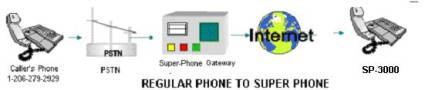
To call from Regular Phone to a Super Phone at a remote
location from the USA, dial our gateway number 1-206-279-2929 or
1-206-279-2930. A computer�s voice asks for the Super Phone ID you wish to
dial. Dial your required Super Phone ID. Hear a beep and in a few seconds your
Super Phone at the remote location will ring. That Super Phone must be online.
This is evident by the @ symbol on it.
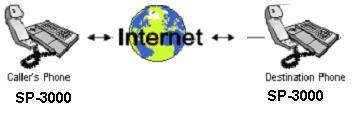
B: Super Phone
to Super Phone Mode: (100% Free)
Put your Super Phone online, using instructions above. Know
the receiving party's Super Phone ID Number (on the Back of the Super Phone.)
Confirm that their Super Phone is online. Dial * + [Six-digit ID of
remote Super Phone] # Ex: *710001#.� The
LCD screen shows search for the other Super Phone. Hear the Super Phone ring
like a regular phone. The other party picks up. Talk.
If your Super Phone screen says "PARTY OFFLINE,"
it means that the other party you are calling is not connected to the Internet.
You need to have them connected to the Internet first.
Checking
Your Account Balance
Check your Device ID number and ITSP account
balance by pressing DISPLAY button on
the SP-3000. The balance will show on the LCD panel.
Also check your balance on SP-PHONE mode (LED
on). Please pick up the handset or press SPEAKERPHONE button. Dial *88 to check
ITSP Account balance or *99 to check Device ID Number balance. The balance will
show on the LCD panel.
Personal
Account Maintenance
Signing up for a personal account
If Super Technologies has your email address
on file when you purchase Super Phone, you will receive a notification email
that includes your login user ID and password for accessing your new personal
account.
Signing in to your personal account
Go to http://admin.mysuperphone.com/
Enter your login user ID and password.
What you can do with your personal account
View your order
Change password
Personal Info
Talk time History
Add Talk Time (You must have a credit card
authorization on file).
Refer a Friend
Super Phone LCD Display FAQ Chart
|
LCD Message |
Meaning |
|
@ Blinking |
|
|
@ Not Blinking |
|
|
Balance XXXX |
|
|
DHCP fail |
|
|
Expired |
|
|
In progress |
Two
parties are using Super Phone for communication. It shows after your
counterpart presses |
|
Internet error |
|
|
XXXXXX call |
|
|
Line busy |
|
|
Link XXXXXX |
|
|
Network error |
|
|
No phone no. |
|
|
No service |
|
|
Party offline |
|
|
Please wait |
|
|
PPP error |
|
|
Ready for dial |
|
|
Search XXXXXX |
|
|
Server Busy |
|
|
Server found |
|
|
The end |
|
|
Wrong account |
|
|
Wrong device |
|
|
Wrong number |
|
|
Save money |
|
|
Super Phone # |
|
|
Press # # on phone keypad |
|
|
Press *88# on phone keypad |
|
|
Press *99# on phone keypad |
|

Troubleshooting
1. How do
I know if my configuration is successful?
After you complete Basic Setup, the LCD panel
shows a steady (sign on
PSTN Mode or a steady @ sign on SP-PHONE Mode.
2. If my (sign (on PSTN Mode) or @
sign (on SP-PHONE Mode) is not steady, i.e., flashing, what should I do ?
Check the Basic Setup Items: IP Address,
Gateway IP Address, Subnet Mask. You may get the above information from your
ISP or MIS personnel.
3. Do I
need a real IP address to configure my SP-3000?
Yes! You need to assign a real IP address to
your SP-3000. Moreover, this IP address cannot be shared by other equipment on
the LAN.
4. If my
ISP assigns a dynamic real IP to me, what I should do?
Some broadband operators assign dynamic IP
addresses to subscribers. SP-3000 supports DHCP function. Make sure the dynamic
IP is real IP. Go to DHCP setup item and enable this function.
5. If
there is a DHCP on the LAN, what I should do?
SP-3000 supports DHCP function. If there is a
DHCP server on your network environment, simply go to DHCP setup item and
enable this function.
6. What
kind of network interface does my SP-3000 support?
SP-3000 provides value-added voice
communications for broadband or wideband users. It� supports Ethernet interface from Leased Line, xDSL and Cable
Modem.
7. There
is a firewall on my LAN. Will it block my voice?
If there is a firewall on your LAN, it blocks
the voice packets, too. At this moment, the remote party can hear your voice,
but the remote party�s voice will be blocked by the firewall. Please advise
your MIS personnel to open UDP 1101 port and TCP 1100 port, so the voice data
can pass through.
8. If I
have a PBX in my office, can I share the SP-3000 so that everyone can use it?
The home version of SP-3000 is designed for
individual users. We don�t recommend you equip home version of SP-3000 on your
PBX system. The impedance might cause noises. We recommend you to use the other
SUPER TECHNOLOGIES� Ethernet Phone Device �Super Phone� for PBX application.
9. Can I
upgrade my SP-3000?
Yes! Super Technologies keeps on providing
more functions to users. To download the latest version, simply go to SYSTEM
SETUP and enter AUTO UPGRADE item. Press ENETR button. SP-3000 will download
the latest software for you automatically.
Contacting
Super Phone Support
Reach Super Phone Suppor at the following phone
numbers for talk time and support. Dial *887009# on your Super Phone when it is
online with @ sign displayed. Or call 1.800.959.8924 from a regular phone.
On the web logon to http://www.mysuperphone.com/usersupport
any time and describe your problem.
On ICQ add ICQ Number 132814115.
On MSN add the ID [email protected]
For sales and other business development
queries, contact us at 1.800.959.8923 or email at [email protected]
On the web you may reach us at http://www.mysuperphone.com/contact
If you live in USA, you may also mail us or
visit our office at
Super Technologies,
Inc.
914 Scenic HWY
Pensacola, FL 32503
USA. Ph:
1.800.959.8923
T A L K� O V E R��
I N T E R N E T�� F O R�� F R E E
Super Technologies, Inc.